
Open Claw Stack v3: A Multi-Layer MCP Aggregation Topology
The v3 iteration of my Open Claw Stack — bundling OpenClaw and MetaMCP into a multi-layered, multi-gateway topology that stress-tests MCP discovery across nested aggregators.
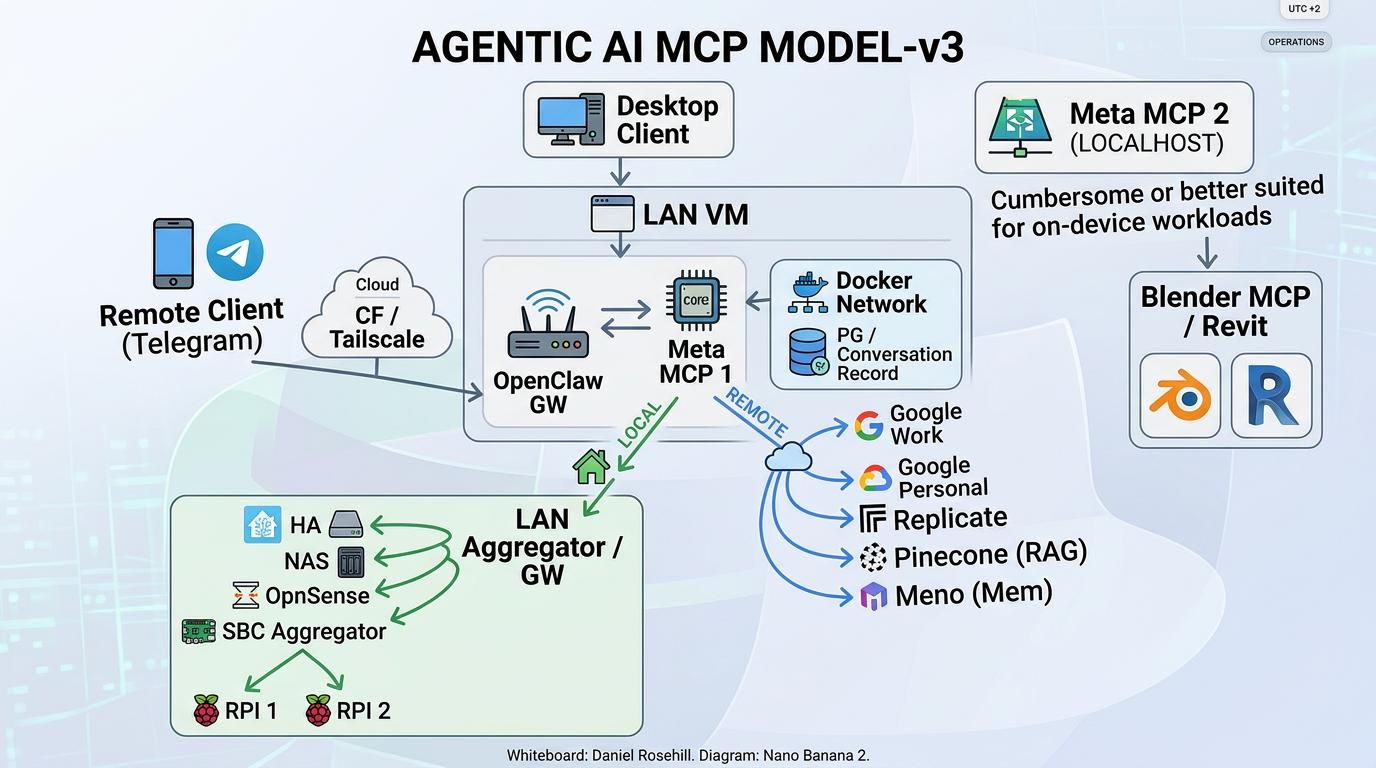
Open Claw Stack is my version-controlled deployment pattern that bundles OpenClaw (the personal AI assistant gateway) and MetaMCP (the MCP aggregator) into a single Docker Compose stack. v3 is the most ambitious revision yet — it expands from a flat aggregator into a multi-layered, multi-gateway topology designed specifically to validate that MCP discovery and tool routing still work cleanly when traffic traverses several nested aggregation points.
Clients
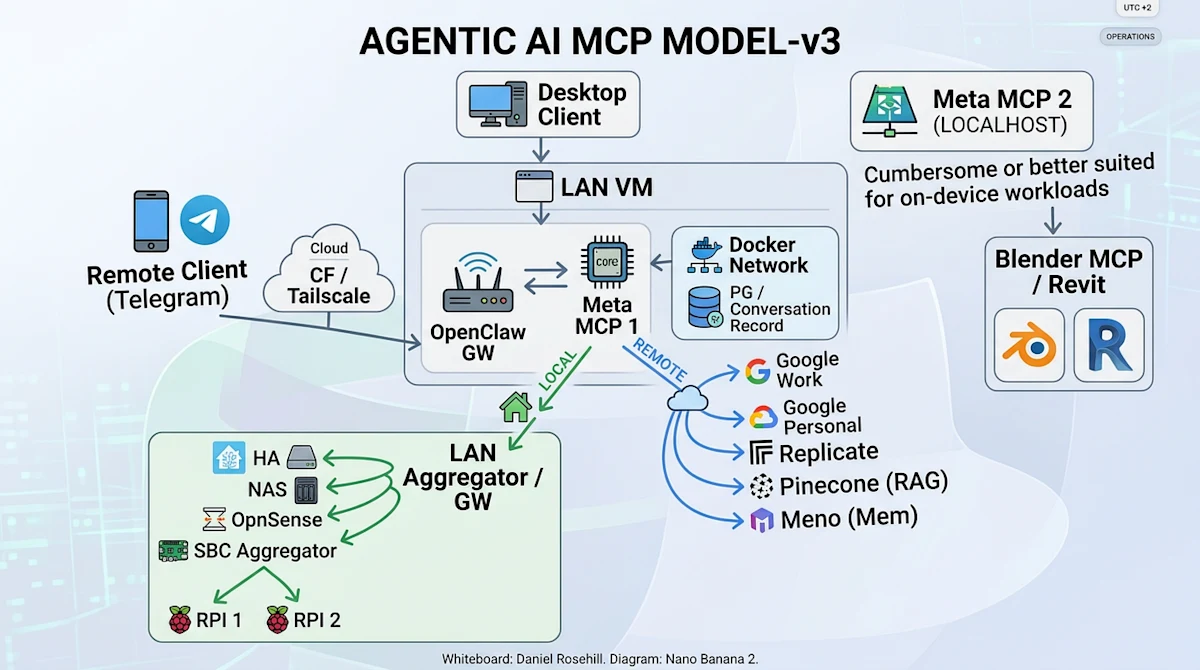
Desktop Client — connects directly to the LAN VM when on-network.
Remote Client (Telegram) — reaches the stack from outside the LAN via a Cloudflare Tunnel + Tailscale path.
LAN VM (primary host)
The LAN VM hosts the core of the stack:
OpenClaw GW — the user-facing gateway / chat surface.
Meta MCP 1 — the primary MCP aggregator that OpenClaw talks to. It fans out to both local (LAN) and remote (cloud) MCP backends.
Docker Network — internal Docker bridge containing supporting services, including a Postgres instance used for conversation records.
LAN Aggregator / GW (experimental)
A second-tier aggregator running on the LAN, reached locally from Meta MCP 1. It groups together purely on-LAN MCP sources:
Home Assistant
NAS
OpnSense
SBC Aggregator (experimental) — a further nested aggregator that itself fronts small single-board computers (RPI 1, RPI 2) exposing their own MCP endpoints.
Both the LAN Aggregator GW and the SBC Aggregator are experimental. The point of this layout is to validate that MCP tool discovery, naming, and invocation still work cleanly when traffic traverses multiple gateway layers (OpenClaw → Meta MCP 1 → LAN Aggregator → SBC Aggregator → device).
Remote / Cloud MCP services
Meta MCP 1 also routes outbound to cloud MCP services over a Cloudflare path:
Google (Work) and Google (Personal)
Replicate
Pinecone (RAG)
Meno (memory)
Meta MCP 2 (localhost)
A second MetaMCP instance pinned to localhost on the desktop, intended for tools that are cumbersome to run inside the VM or are better suited to on-device workloads — currently fronting Blender MCP and Revit.
Aggregation layers (v3)
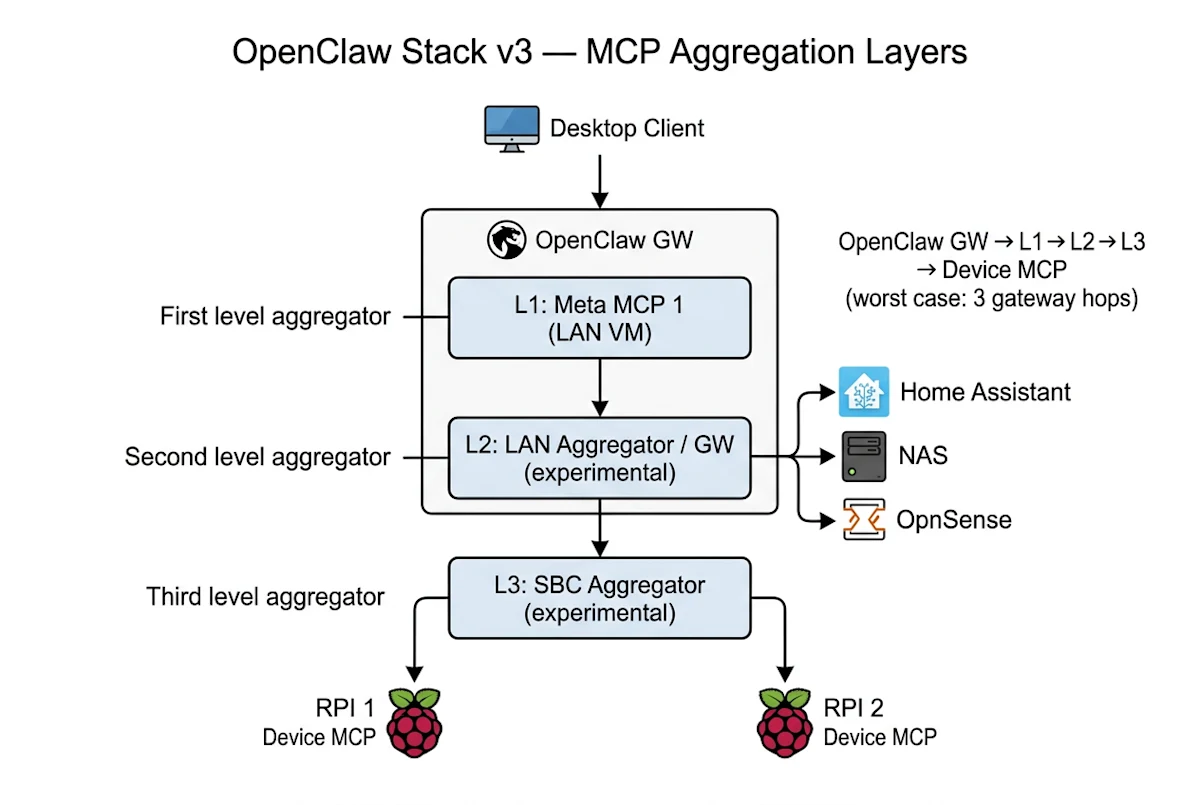
In the v3 model an individual MCP server can sit behind up to three nested gateway layers:
L1 — Meta MCP 1 (on the LAN VM): first-level aggregator that OpenClaw GW talks to. Fans out to local and remote MCP backends.
L2 — LAN Aggregator / GW (experimental): second-level aggregator reached locally from L1. Groups LAN-only sources (HA, NAS, OpnSense) and the SBC branch.
L3 — SBC Aggregator (experimental): third-level aggregator nested under L2, fronting the small single-board computers (RPI 1, RPI 2).
So in the worst case, a tool call from the desktop client traverses: OpenClaw GW → Meta MCP 1 (L1) → LAN Aggregator (L2) → SBC Aggregator (L3) → device MCP. The point of the experimental L2/L3 branch is to validate that MCP discovery, naming, and tool invocation remain coherent across this many hops.
Suggested MCP servers
A non-exhaustive list of MCP servers that fit naturally into the v3 layout:
OpnSense — Pixelworlds/opnsense-mcp-server (sits behind the L2 LAN Aggregator).
Home Assistant — tevonsb/homeassistant-mcp (LAN-side, behind L2).
Blender — ahujasid/blender-mcp (pinned to Meta MCP 2 on localhost).
Pinecone (RAG) — pinecone-io/pinecone-mcp (cloud, via remote branch).
Google Workspace — taylorwilsdon/google_workspace_mcp (cloud, via remote branch).
Design intent
Keep private/LAN-only services strictly on the LAN side, behind nested aggregators.
Keep cloud services proxied through a single hardened egress path.
Keep host-bound creative tooling (Blender / Revit) on a separate localhost MetaMCP rather than pushing it through the VM.
Use the experimental nested-aggregator branch to stress-test multi-hop MCP discovery before promoting it out of experimental status.
Components
OpenClaw — personal AI assistant (gateway + CLI). Ports 18789 (gateway), 18790 (bridge).
MetaMCP — MCP aggregator/orchestrator/gateway. Port 12008.
PostgreSQL — database backend for MetaMCP. Port 5432.
Watchtower — automatic container image updates.
Cloudflare Tunnel — secure external access without port forwarding.
On-LAN access
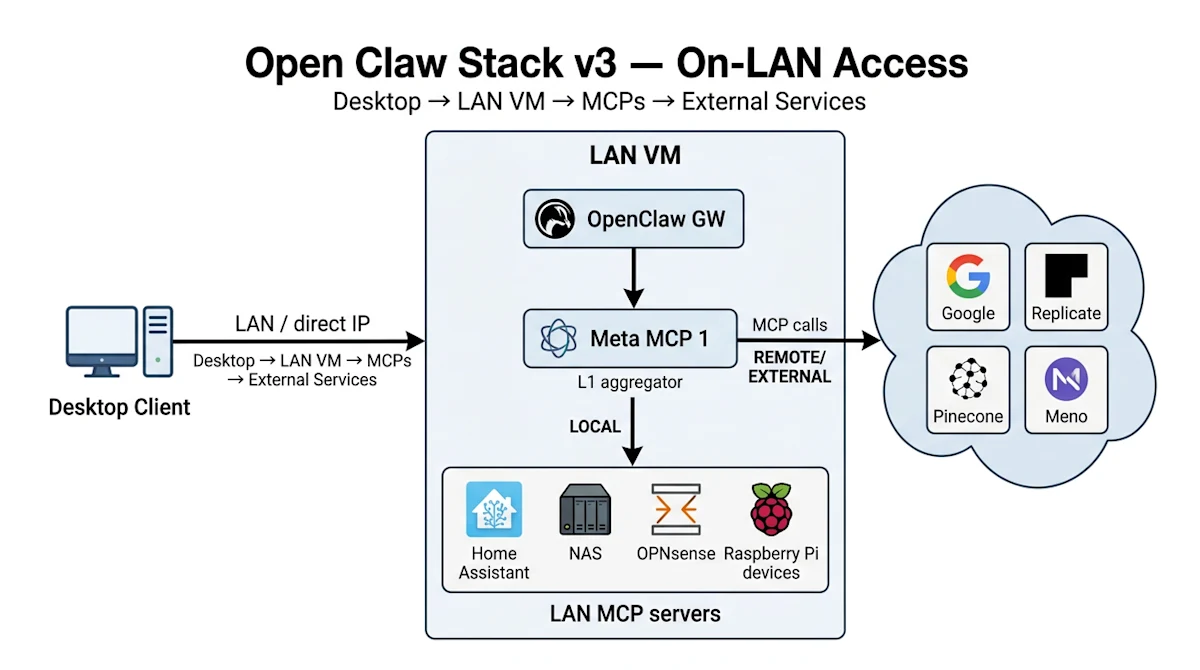
When the desktop is on the home network it talks directly to the LAN VM (LAN IP / anti-hairpin DNS), hits OpenClaw GW, which fans out through Meta MCP 1 to LAN MCP servers and outbound to external/cloud MCP services.
Remote access via Cloudflare
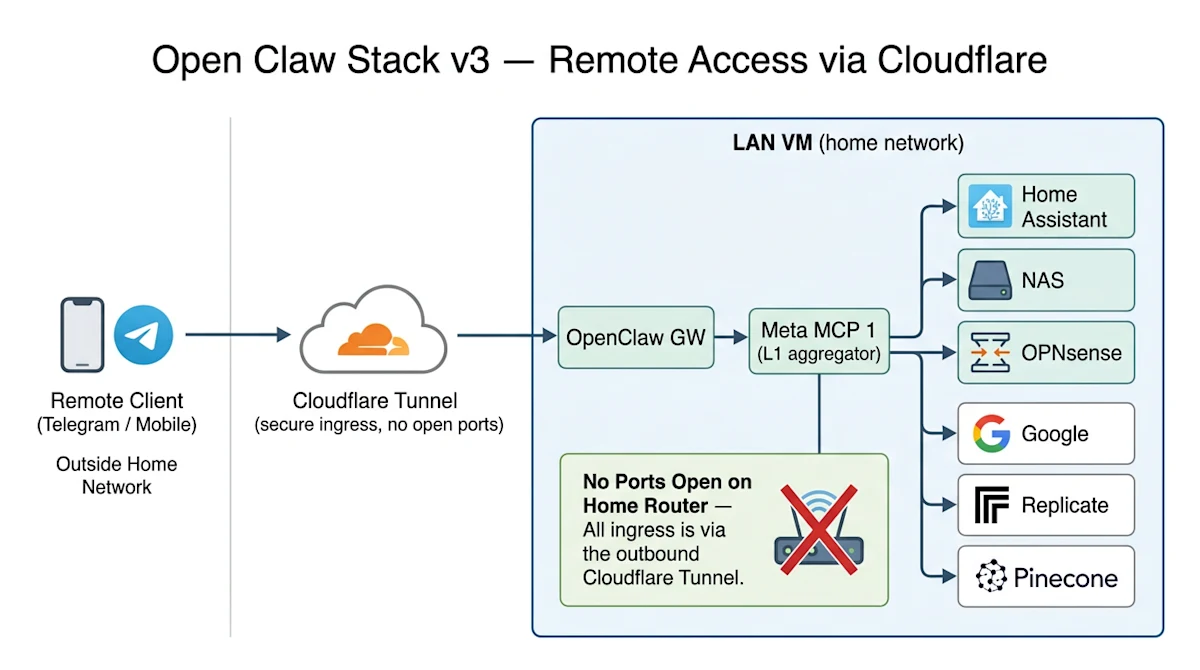
From off-network, the client (e.g. Telegram) reaches the LAN VM via a Cloudflare Tunnel — no ports opened on the home network. From there the request lands on OpenClaw GW and follows the same internal aggregation chain.
Deployment
Both projects use Docker Compose as their official deployment method. This stack combines them into a single docker-compose.yml so they can be deployed together on an Ubuntu server. OpenClaw runs as a gateway service exposing a web UI and bridge for channel integrations; MetaMCP provides a unified MCP endpoint, aggregating multiple MCP servers behind a single proxy with a management UI; PostgreSQL is required by MetaMCP for configuration and state storage. OpenClaw is configured to use MetaMCP as its MCP endpoint, giving the assistant access to all MCP servers managed through the MetaMCP dashboard.
Setup is three steps: clone the repo and copy example.env to .env; set CLOUDFLARE_TUNNEL_TOKEN (create a tunnel in Cloudflare Zero Trust > Networks > Tunnels) and configure tunnel ingress rules to point your domains at openclaw-gateway:18789 and metamcp:12008; then docker compose up -d.
The full v3 stack (docker-compose.yml, env example, and the diagrams above) lives at github.com/danielrosehill/Open-Claw-Stack.